
Camera Can't See My Full Body
Use Your Phone as the Camera (Recommended)
No extra hardware needed: The Link phone app turns your phone into the computer's camera directly — the rear wide-angle lens in portrait orientation covers your full body in most rooms. Click Connect Phone on the main window. If this PC has never paired a phone, scan the download QR first and choose Already have the app? Continue to Pairing; if pairing information exists, the pairing/reconnection panel opens directly. The phone's microphone is preferred automatically too:
Full walkthrough: Use Your Phone as Camera & Mic (Step by Step)
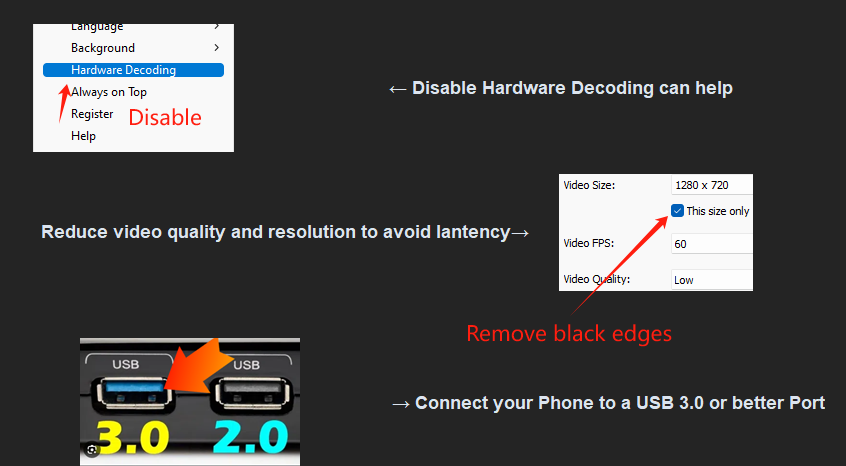
Third-party apps such as iVCam also work as a fallback (they connect as a virtual camera, with higher latency than The Link phone app). Make sure to disable hardware decoding and lower the quality:
Rotate Your Existing Webcam Vertically
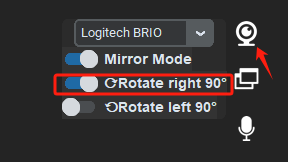
If your current webcam is decent and you can mount it vertically, rotate it 90°, then click the 📷 camera button on The Link's main window and use Rotate left 90° / Rotate right 90° to rotate the feed (Flip vertically for upside-down mounts):
Note: rotating does not auto-adjust saved models — poses and hitboxes must be re-captured afterwards, so decide your camera orientation before building an advanced model.
Buy a Wide-Angle Webcam
Just like smartphones, how much a webcam sees depends on its lens. A wide-angle webcam lets you stand much closer and still fit your whole body in the frame.
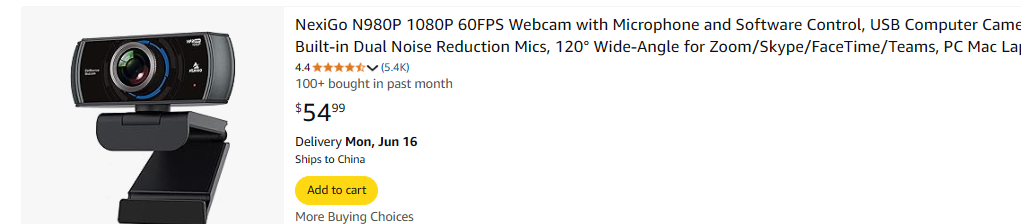
Users report great results with the NexiGo N980P: about $54, 720p at 60 FPS, 120° field of view — ideal for full-body tracking in smaller spaces:
Note: extremely wide-angle lenses can cause obvious image distortion. A 120° lens plus the built-in rotation covers nearly all gaming scenarios.
Alternative: No Walk Recognition — Half-Body + Custom Movement
The Link is highly customizable: in theory you can design your own movement system with hitboxes + gestures, even with only half your body in frame. As long as your leg lifts into view, The Link can recognize that frame and trigger a key press.
Note: with this approach you cannot use walk recognition. Filming only half your body means the camera can sit at any height (it still needs to face you directly), and you don't need to align with the stance figure (you can simply turn off Show figure during game in Overlay Setup).
Keep in mind this isn't the intended way to use The Link — you'll need to experiment to control your character with half your body. But if you only have a laptop and want to jump into motion gaming right away, it can be a good starting point.