
Similarity
Similarity, as the name suggests, is how closely your current pose matches the pose the software remembered when you added pose recognition — expressed as a percentage.
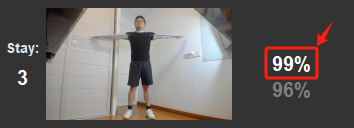
The percentage shown on the pose widget is the trigger similarity; the leave similarity is hidden at rest and appears when you hover over the widget.
Trigger Similarity
The value you will tune most often: lower makes the pose easier to trigger; higher makes it harder (your motion must be more precise).
When your similarity is greater than or equal to this value:
- Every output set to Execute Once fires once immediately;
- In keyboard & mouse output:
- keys set to Hold are pressed down;
- keys set to Spam start spamming;
- keys set to Trigger & Release run the actions before the loop marker
 ;
;
- Every Hold-mode Wrist To Cursor, Wrist To Mouse, Page Toggle, and Link Toggle output temporarily switches on or off according to your settings;
- Other output types (system control commands, Link Joy controller buttons, and so on) likewise start executing in their configured mode.
Leave Similarity
When your similarity falls below this value, The Link decides you are no longer holding the pose:
- All Execute Once outputs become eligible to trigger again;
- In keyboard & mouse output:
- keys set to Hold are released;
- keys set to Spam stop spamming;
- keys set to Trigger & Release run the actions after the loop marker;
- All Hold-mode Wrist To Cursor, Wrist To Mouse, Page Toggle, and Link Toggle outputs reverse their state — whatever was switched off at trigger time switches back on, and vice versa.
How the Two Values Move Together
- Scrolling the wheel on trigger similarity moves leave similarity in lockstep, preserving the gap between them;
- Adjusting leave similarity on its own changes the gap;
- Leave similarity ranges from 0 to 99, always acting as the "release" threshold.
Stay and Similarity
Stay (in seconds) charges with band tolerance: once charging starts, it keeps going as long as similarity stays at or above the leave similarity; only dropping below the leave similarity resets it. If a pose with Stay never manages to trigger, lowering the leave similarity usually fixes it.
Hitboxes Have No Similarity
Hitbox inputs do not use similarity: their condition is simply the chosen body part entering/leaving the box (optionally with Stay), so no similarity appears on a hitbox widget.
Watch It Live in the Capture Window
The similarity ribbon at the bottom of the pose capture window shows your current similarity against both thresholds — Trigger ≥ N% / Release < N% — in real time. Watching how the value fluctuates during fast motion is the most intuitive way to pick both numbers. See Pose Recognition.