
Motion Data
What is Motion Data
Motion Data is the workout-stats panel in the Settings hub (Settings → Motion Data). Every valid workout is settled into a battle report: calories, steps, jumps, best chain, and duration — plus a check-in streak and a collection of level rewards. After signing in, the same account carries this compact state across computers.
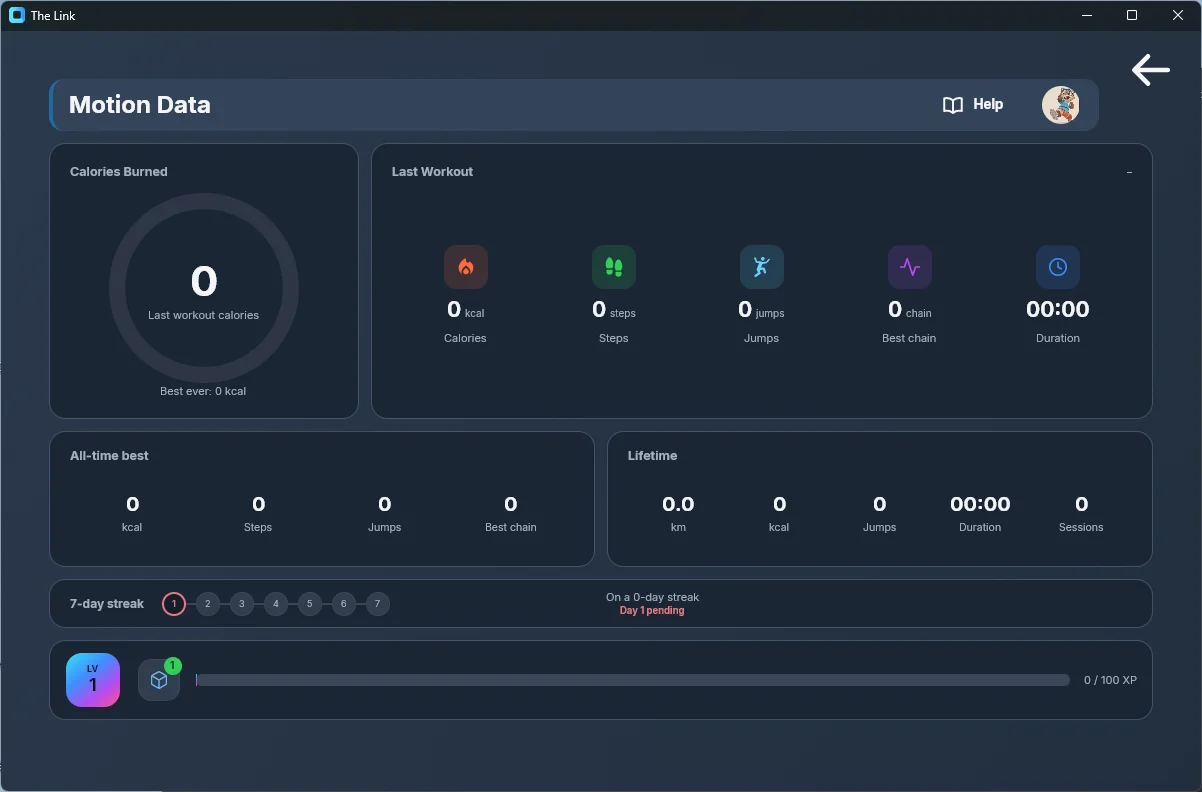
(The screenshot shows the empty, signed-out state.)
The panel
- Header: the Motion Data title, with the avatar button (opens your profile editor) and a help button on the right.
- Calories Burned: the hero ring of your last workout's estimated calories — 300 kcal per lap, overflowing into hotter-colored extra laps; the all-time record sits below.
- Last Workout: the five numbers of your last workout — calories / steps / jumps / Best chain (violet) / duration, with its start time at the top right.
- All-time best / Lifetime: best single-session records (including best chain) and lifetime totals (distance, calories, jumps, total time, sessions).
- 7-day streak: circles for day 1 through day 7 of your current streak, laid out in sequence; completed days light up with a green check, the next day reads "Day N pending", and the card shows "On a N-day streak".
- Bottom level card: the LV badge, the Reward Collection button with a green count badge, and the XP bar (current XP / XP needed for the next level).
XP and levels
XP = lifetime kcal×10 + jumps×3 + km×20, plus any bonus XP won from reward draws. Distance is estimated from steps (about 0.7 m per step). Reaching the next level costs 100 × current level XP (100 XP from level 1 to 2, 200 XP from level 2 to 3, and so on).
Chain (combo) rules
Any action's trigger edge within 3 seconds of the previous action's edge chains +1; a longer gap breaks the chain and restarts at 1. The chain measures action chaining — it is independent of the jump-count debounce, so rapid consecutive jumps still chain. Each session records its best chain; the all-time best is kept in your records.
Level rewards: claim and draw
Crossing a level arms a reward settlement: back in the panel, click the LV badge (tooltip Claim your level-up reward; the badge shows a count when several level-ups are waiting) to draw. Each draw randomly opens one reward you do not own yet, or grants bonus XP that goes straight into your level progress; the first draw is guaranteed to be a reward, after which rewards and bonus XP are equally likely.
In the current version all 15 rewards are placeholders — the collection shows them as "Reward 1 … Reward 15 · Coming in a future update"; the real rewards will open up in later releases.
The Reward Collection page is view-only, not where you equip things: choose skeleton colors, line styles and hand effects under Settings → Advanced → Workout Reward Appearance, and change your avatar in your community profile (Motion Hub).
The server stores only compact account state — lifetime totals, the settled level, bonus XP and pending unlocks; the actual assets and feature code stay on the computer for instant use.
Workout Complete
When the runtime window closes and this workout burned more than 5 kcal, the Workout Complete summary appears (a sub-5-kcal session neither counts toward your stats nor pops the window): this session's duration, calories and steps at a glance. It never dismisses itself — close it with OK, the ✕ in the corner, or the Esc key; the chevron on its side jumps straight to the Motion Data panel. Level-up rewards are not added automatically — claim them by clicking the LV badge in the panel. The toggle lives under Settings → Advanced → Features ("Show the workout summary after each session", on by default).