
Switch Page
At the top of The Link's main interface you can add multiple category pages to organize your Links. Right-click a page tab to manually Enable or Disable it; a disabled page turns grey but can still be opened and edited, and only the first page cannot be deleted.
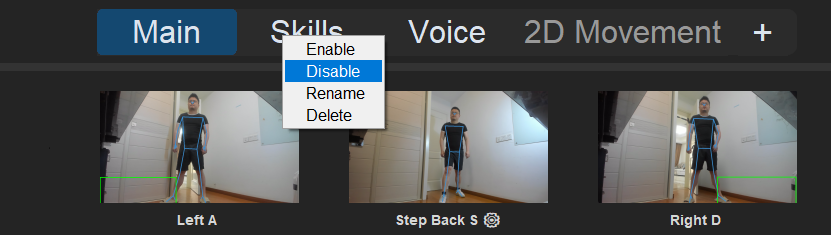
The Page Toggle output lets you enable or disable those pages dynamically in-game, using poses, voice, or any other input.
How to Add One
- On the output side of the Link Window, scroll the mouse wheel over the recording button (or hover the small ▽ next to it) and choose Page & Link Control.
- The popup has two tabs at the top: Page Toggle and Link Toggle — stay on Page Toggle.
- Pick the page you want to control from the dropdown.
- Click Add Page — On or Add Page — Off. Clicking adds the entry immediately — there is no separate enable switch or "remove" button; if you add the wrong one, just click that entry's × in the output frame.
- Choose the behavior mode in the dropdown below (Execute Once / Hold / Trigger & Release / Spam).
- Click OK to close the popup. Note that clicking outside the popup does not dismiss it — use OK or the × in its corner.
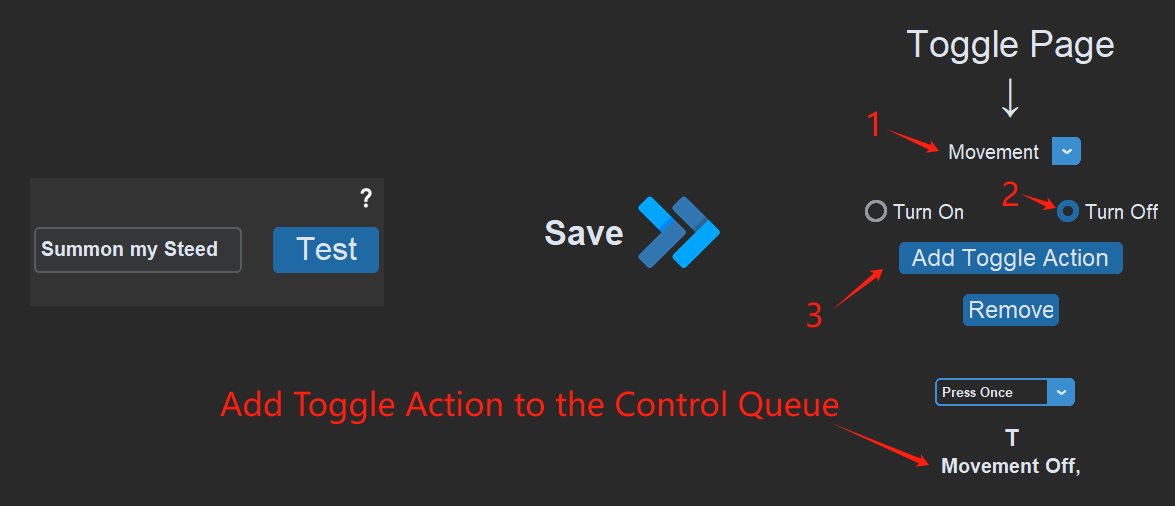
Once added, badges appear in the output frame, such as Movement On or Riding Off.
Example: Summon a Horse by Voice
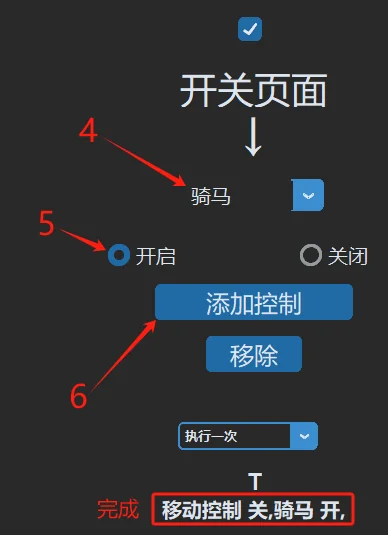
Let's design a voice command "Summon my steed" that, while pressing T:
- Disables the walking Movement page
- Enables the Riding page
Now saying "Summon my steed" presses T to summon the horse, turns off all walking controls, and turns on all riding controls at the same time.
Tips & Best Practices
Make sure the mount/dismount switching actions themselves are not inside the Movement or Riding pages (keep them on the "Main" page), so you can switch at any moment.
In intense gameplay you will often get knocked off your horse unexpectedly. Players then forget they never performed the dismount pose and try to counterattack — but because the page never switched, walking and dodging won't trigger.
The fix: on your "Main" page, bind Disable Riding page + Enable Movement page to your most frequently used attack action. When you go to attack, the page switch happens automatically.
Dynamic Page Toggle
Following the same logic, choose Hold instead of Execute Once when adding a page toggle to enable or disable a page only while the pose is held — it reverts as soon as the action ends.
For example, temporarily disable all movement controls while channeling a spell, to prevent accidental steps.