
Wrist to Mouse
Function Overview
The Wrist to Mouse is now called Wrist To Mouse with the subtitle Look/Turn: once activated, it continuously maps the movement of your right (or left) hand to the relative movement of the computer mouse — exactly like a traditional mouse.
To add it: in the Link editor, click the ▽ next to the output area to open the output menu, choose Body-Mouse Sync, select the Game Camera Mouse tab in the centered popup, then click OK:
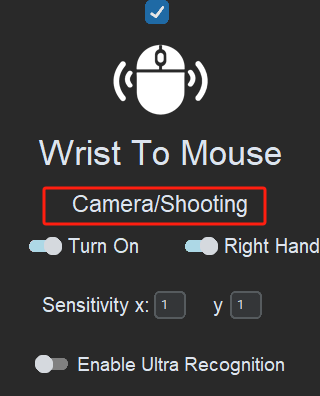
In the popup you can tune Sensitivity x and Sensitivity y separately (decimals supported, e.g. 0.6/0.3) to control horizontal and vertical speed.
Note that body-motion outputs only offer Execute Once and Hold (Trigger & Release and Spam are options of recorded keyboard & mouse outputs).
Application Scenarios
Camera Control
Because Wrist To Mouse uses the same movement principle as a standard mouse, it can be used for in-game camera control and aiming.
When using it for camera control, remember to set it to Hold mode. For online games that require holding the left or right mouse button to rotate the camera, also add a "hold left/right click" with keyboard & mouse recording.
For more details about camera and character turning, see: Game Camera & Character Turning
Ground-targeted ability / skill
Move the mouse to a point on screen first, then fine-tune the cast position with your hand via Wrist To Mouse:
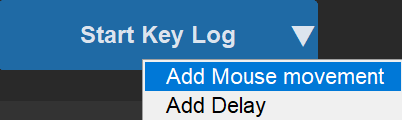
- Choose Add Mouse movement from the ▽ output menu:
-
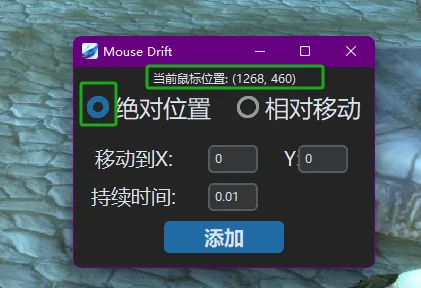
Pick one of the two tiles — Relative Movement or Absolute Position (here: Absolute Position). The main window minimizes into a full-screen capture: simply click the real spot on your screen where the skill should roughly land (for Relative Movement, hold the left button and drag to record a displacement). The movement duration defaults to 0.5 s (relative) / 0.2 s (absolute) and can be fine-tuned later by double-clicking the recorded step.
-
Once The Link moves the mouse near the casting point, Wrist To Mouse lets you fine-tune the exact release position.
-
Finally, you can use Trigger & Release on the keyboard & mouse output together with an exit similarity, so leaving the pose stops Wrist To Mouse and presses the release key at the same time (or add a delayed auto left-click to give yourself a short aiming window).
For more on Trigger & Release and poses see: Similarity; for mouse-movement details see: Keyboard & Mouse
Controller Mode
When the model is switched to controller mode, the Body-Mouse Sync row disappears from the output menu. In its place are the Joy-Con-specific Stick-Mapped Mouse and Gyro-Mapped Mouse — when triggered, the selected stick or the controller's gyroscope is mapped to mouse movement, great for players who steer the camera with a physical controller.
Where did Ultra Recognition Mode go?
The old "Ultra Recognition" switch inside the Wrist To Mouse window has been removed from the UI.
Gesture recognition is now enabled from the leftmost notch of the performance bar in Settings — Full Body + Gestures. Switching to that notch recognizes hand gestures alongside full-body tracking (note it increases CPU load). For details see: Hand Recognition
The editor also offers a Built-in simple mouse gestures option: it adds click, drag, and scroll gestures without disabling your Hand Links.