
On this page
These steps target keyboard/mouse controls in a computer game or emulator. The Link phone companion controls the computer; it does not directly control Honor of Kings running on the phone.
Check bindings
Test movement and one skill in the computer game/emulator. Find a model in Discover Models, or create a blank model and record your keys. These steps do not require a published Honor of Kings template. Complete template setup.
Make a virtual dance pad
- Add separate forward/back/left/right Hitboxes, tracking a body part that stays visible.
- Record the actual movement keys, select Hold, then Save each Link.
- Leave a neutral area where every direction releases. Test four directions first, then check overlapping diagonal areas.
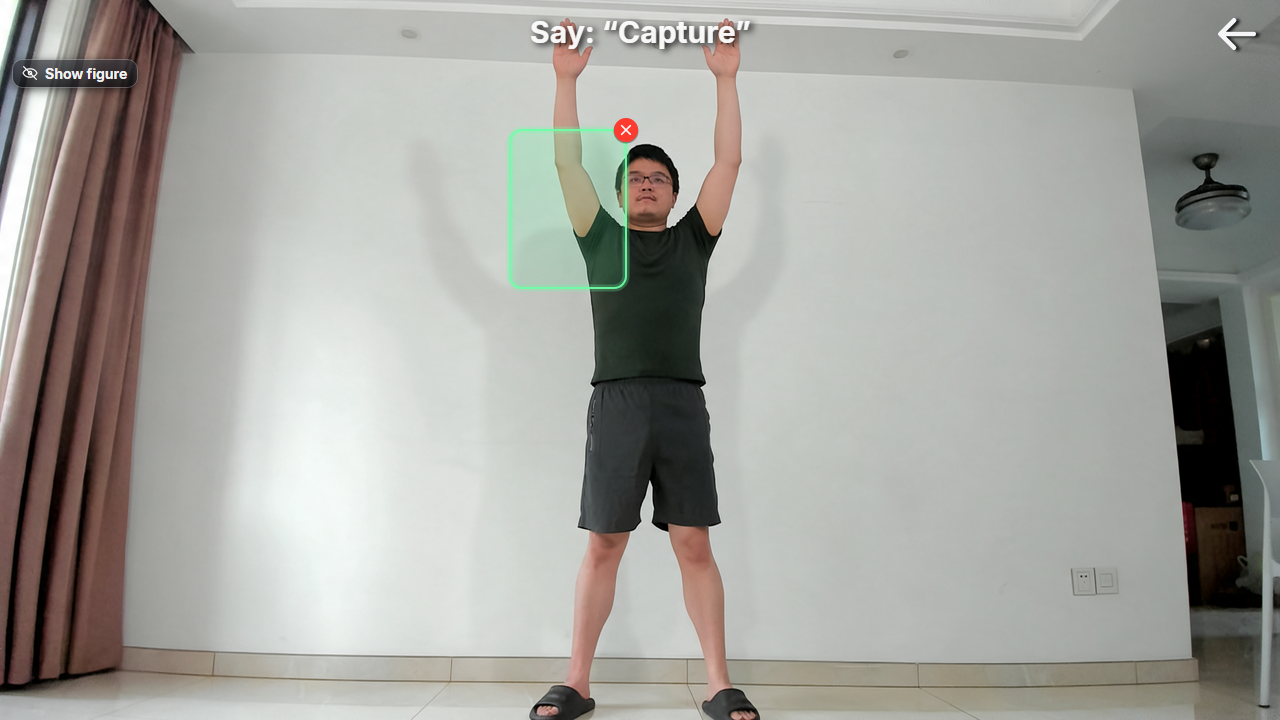
Drag the green Hitbox to adjust its region. Create separate direction Links and leave a neutral position.
Aim and cast one skill
For a screen target, record Add Single/Continuous Mouse Movement → Absolute Position, then add the required button press/release. Recheck after changing the emulator window or resolution.
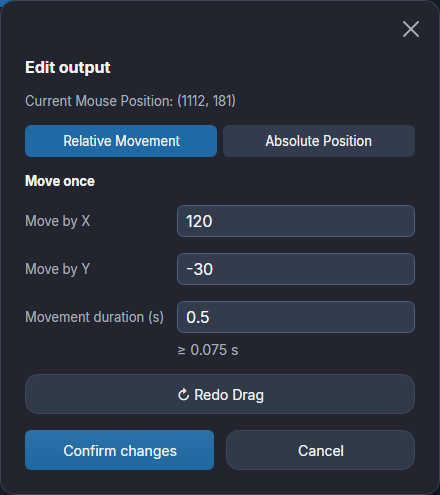
Choose Relative Movement or Absolute Position at the top. This example edits the X/Y distance and recorded duration of one relative movement; Confirm changes applies the edit. Redo Drag records again.
Use Game Camera Mouse for continuous fine adjustment or Desktop/Menu Mouse for screen pointing. Get movement and one skill working, save, then add the next. Check equipped skill slots in the game.