
On this page
Check keyboard/mouse or controller bindings in your installed Stellar Blade. Find a model in Discover Models or create a blank one, then complete template setup.
Make one dodge reliable
If ordinary movement causes dodges, add a short Hold time, adjust similarity or move the Hitbox away from your normal resting position. A longer Hold time adds intentional delay, so retest the timing in game.
If ordinary movement dodges too, tune Hold and similarity on the input card, or move its Hitbox. Hold adds waiting time, so retest timing in the game.
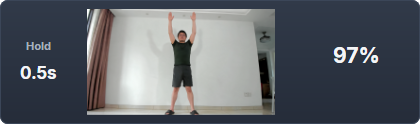
Adjust Hold on the left of the input card and its trigger percentage on the right. The shown values are examples.
Add attack and camera
Use output Hold only when the game needs a sustained key. Check release before adding another action. Aim with Game Camera Mouse, a controller or phone; disable competing camera Links while tuning.
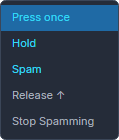
Open the execution selector below the output. Hold sustains the key; Spam repeats it. For one tap, choose Press once at the top of the menu.
Verify and save
Test attack, dodge and camera separately, then together. Sustained output should end when you relax. Save a named model. See Troubleshooting when recognition succeeds but the action is ignored.